


TL;DR: Neodymium 5.1 has been released with a host of impressive new features. These include full-page screenshots in reports, enhanced control over JSON assertions, accessibility testing via Google Lighthouse, and simplified session handling and URL validation.
The newest enhancements primarily focus on these key areas to boost testing efficiency and user experience.
Enhanced Reporting: We’ve significantly improved the quality and usability of test reports. You now get more informative and insightful results with features like full-page screenshots, enhanced JSON assertions for easier data comparison, and a streamlined report structure for improved readability.
Accessibility Testing: Recognizing the growing importance of web accessibility, we’ve integrated Google Lighthouse to automate accessibility checks. This allows you to easily identify and address accessibility issues within your web applications, ensuring compliance with WCAG standards.
Streamlined Workflows: We’ve introduced several features to streamline your testing processes. These include improved session handling for cleaner test environments, enhanced configuration options for greater flexibility, and robust URL validation to prevent unintended access to sensitive systems and ensure test stability.
These improvements are all about making your testing smoother and more dependable. You’ll get better results and learn more from them, so you can build even better software! So, let’s get into the details, shall we?
Enhanced Reporting
Neodymium 5.1 brings significant improvements to its reporting capabilities, providing you with more insightful and informative test results.
Improved Screenshots
You can now capture full-page screenshots with highlighted viewports for better visibility of the test context. Additionally, the last element, the test has interacted with, will be highlighted. This makes it easier to pinpoint the exact location of an interaction and understand the state of the application at that time.
# enable advanced screenshots and full-page screenshots
neodymium.screenshots.enableAdvancedScreenshots = true
neodymium.screenshots.fullpagecapture.enable = true
neodymium.screenshots.fullpagecapture.highlightViewport = true
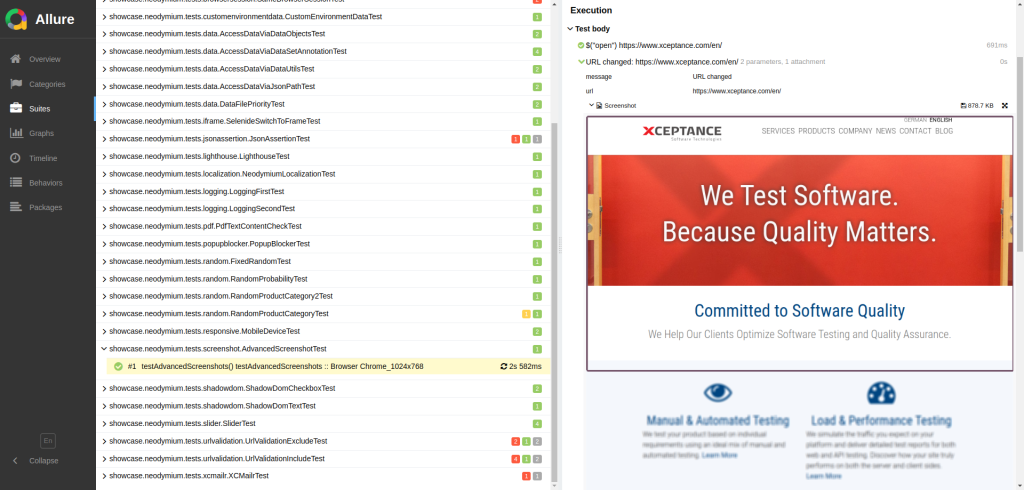 Screenshot within Viewport Marking
Test Data Overview
Gain a deeper understanding of your test data and streamline the debugging process by accessing test data in JSON format for each test case. This detailed data analysis capability allows you to quickly identify and resolve potential issues.
 Test Data within the Allure Report
JSON Assertions
The JSON file comparison feature has been enhanced. It now provides improved accuracy in identifying differences between expected and actual results.
// assert that the files are equal
JsonAssert.assertEquals(expectedJson, actualJson, JSONCompareMode.STRICT_ORDER);
 JSON Comparison Within the Allure Report
Environment Information
We’ve added the browser used for testing to the report’s environment section to give you more context about the test results. Also, you can now add custom values to tell the difference between environments or profiles in your test runs, making it easier to figure out if any setup or deployment problems are causing issues.
# enable custom environment data
neodymium.report.environment.enableCustomData = true

# add the entry 'customData' with value 'customValue'
neodymium.report.environment.custom.customData = customValue
Step Information and URLs
The clickable URLs included in each step of the report simplify and streamline the process to reproduce test failures and navigate to specific application pages at various points during test execution.
Reduced Report Clutter
The report now features fewer INFO sections, providing a cleaner and more concise overview with less visual noise, allowing for easier identification of critical information.
Accessibility Testing
Neodymium 5.1 now includes Google Lighthouse to help you identify and fix accessibility issues in your web applications. This integration supports your compliance with WCAG standards, and shows that we understand how important web accessibility is.
 Lighthouse Report Embedded in Neodymium’s Allure Report
Additionally, you can assert against Lighthouse report data to track changes in state or outcome.
// create a lighthouse report and assert the defined scores and audits
LighthouseUtils.createLightHouseReport("lighthouseReportName");
# set the thresholds for each metric
neodymium.lighthouse.assert.thresholdScore.performance = 0.9
neodymium.lighthouse.assert.thresholdScore.accessibility = 0.9
neodymium.lighthouse.assert.thresholdScore.bestPractices = 0.9
neodymium.lighthouse.assert.thresholdScore.seo = 0.9

# set specific audits to assert
neodymium.lighthouse.assert.audits = is-on-https link-name
Furthermore, this enables WebVitals measurement and verification capabilities.
Workflow Enhancements
Several features help to streamline the testing process and improve overall test automation efficiency.
Popup Blocker
The improved popup blocker boosts test stability by minimizing disruptions from unexpected popups, which can lead to inconsistent test results.
# define locator of the close button for each pop up to handle
neodymium.popup.cookieBanner = #privacy-message .close
neodymium.popup.anotherOne = #someId button
Session Handling
Neodymium now utilizes a dedicated annotation to run @BeforeEach and @AfterEach methods in individual, fresh browser sessions. This guarantees a consistent environment for setup and tear down, and minimizes any influence from prior test steps.
@StartNewBrowserForSetUp
@BeforeEach
public void setUp()
{
    // perform the setup using a dedicated browser
}

// annotation to force a new browser for cleanup
@StartNewBrowserForCleanUp
@AfterEach
public void cleanUp()
{
    // Cleanup code using a dedicated browser
}
Properties
Environment variables can now be used to override Neodymium properties, providing greater flexibility and simpler integration with CI/CD pipelines. This allows for more dynamic test adjustments based on the specific environment or build.
URL Validation
Restrict test access to certain sites only by defining include and exclude lists. This prevents accidental access to live sites or sensitive data, mitigating the risk of unintended modifications. Any attempt to access a URL not included in the defined list will result in an immediate test failure, providing early feedback and preventing further interactions.
# List of included URLs separated by whitespace
neodymium.url.includeList = https://www.xceptance.com/en/$

# List of excluded URLs separated by whitespace
neodymium.url.excludeList = https://posters.xceptance.io/.*Dining
Driver Command-Line Arguments
The configuration now allows for direct pass-through of driver command-line arguments, which streamlines driver setup, facilitates customization, and enables fine-tuning of driver behavior and test execution to meet your specific requirements.
Dependencies
We also updated numerous dependencies to keep them up-to-date and secure. Examples are Selenide, Allure, Log4J, and JUnit.
Summary
Neodymium 5.1 is now available! We value your feedback on new features and any defects encountered. Your input helps ensure Neodymium remains a powerful tool for your needs. You might even find a newer version of Neodymium when you read this article, depending on when you read it.